Creative tools · US iPhone listing

ASO Audit:LumaFusion

Does their ASO suck?

My take: Solid. Put the pitchfork down.

LumaFusion has the material for a strong professional editing story: a multitrack timeline, source clips, audio waveforms, colour controls and scopes. Yet the first still is a wall of accolades. I would test the existing timeline frame first and move the awards behind it, after checking the claims and interface against the current release. This is a focused order test, not a request to replace a serious editor with generic creator imagery.

LumaFusion opening screenshot with Apple recognition, a 2021 Videomaker mark, CNN Academy wording and Editors’ Choice laurels.

Actual listing creative · App Store source ↗

What I actually checked

One storefront, one language and a dated capture. This is an independent editorial audit, not a client case study.

Store & market
Apple App Store · United States
Language & device
en-US · iPhone
Captured
30 September 2026
Creative reviewed
First 3 still screenshots; video and other devices excluded
Observed app name · 10/30 characters

LumaFusion

Observed subtitle · 29/30 characters

Pro video editing and effects

Open the source listing ↗. Public text cannot reveal the private keyword field, search volumes, rankings or conversion rates. The recommendations below are proposals to validate.

Three things worth your attention

01

The useful interface arrives second.

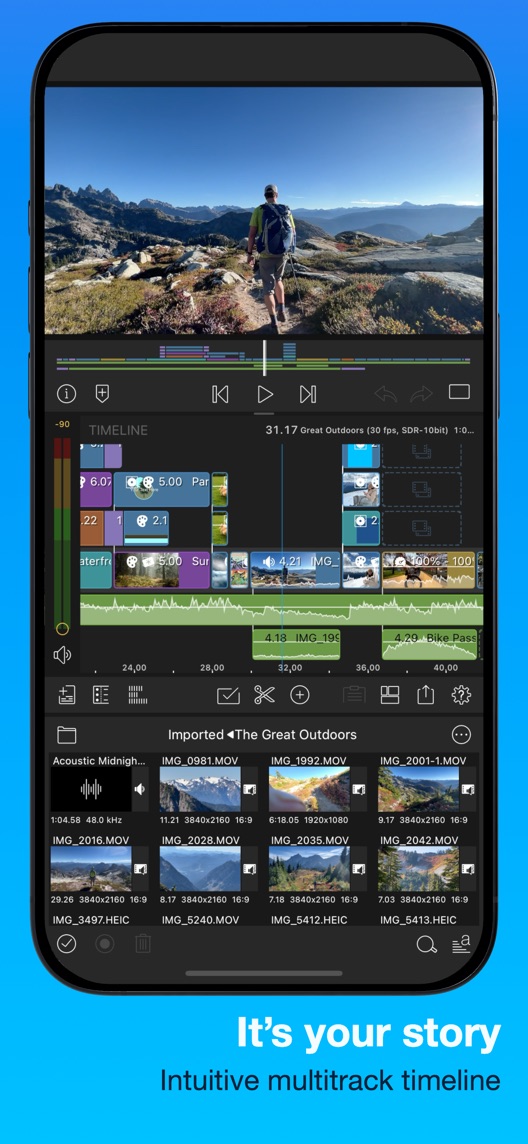
What I saw. The opening contains award and affiliation marks, while the multitrack editing surface appears in the next still.

My read. Editors assessing a mobile workflow may want to recognise the timeline before reading endorsements.

What I’d do. Test moving the verified timeline still to the first position while keeping all three assets otherwise unchanged.

02

The timeline shows a credible task.

What I saw. The second still combines source clips, layered video, audio waveforms and a hiking preview.

My read. It makes assembling footage tangible, though a still cannot establish responsiveness or project reliability.

What I’d do. Preserve the detailed editing surface and verify the represented layout on a current supported iPhone.

03

Professional language needs access context.

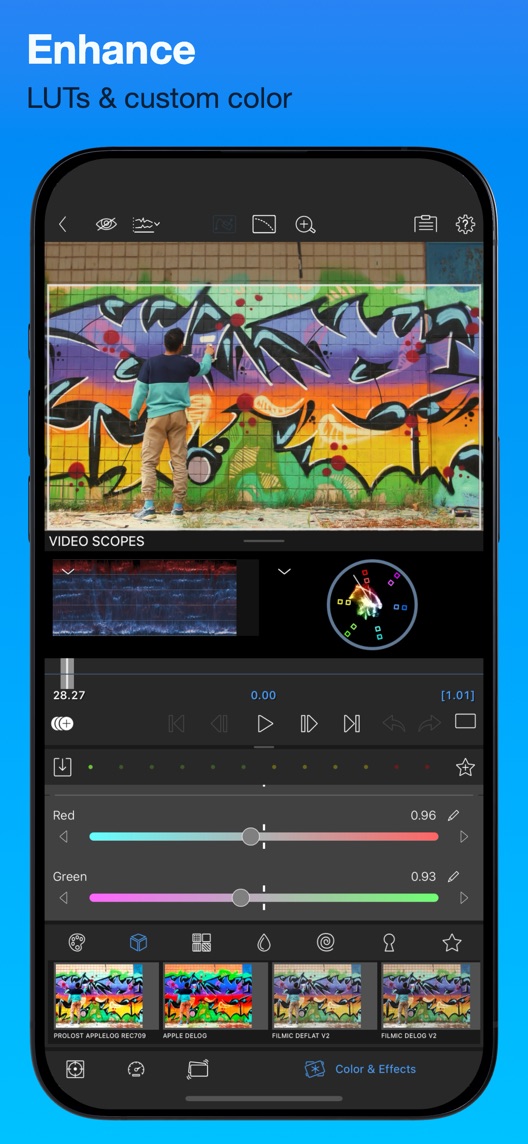
What I saw. The third still shows LUTs, colour controls and scopes; the description separately lists enhanced paid features and a Creator Pass.

My read. Visitors may assume professional editing means every advertised advanced tool is included in the initial purchase.

What I’d do. Prepare a current entitlement matrix and keep paid extras distinct from the specific tools shown.

The screenshot teardown

The original creative is preserved. Numbered notes sit beside each frame so observations and recommendations stay separate.

Frame 01LumaFusion opening screenshot with Apple recognition, a 2021 Videomaker mark, CNN Academy wording and Editors’ Choice laurels.

The first frame is dedicated to publisher-displayed recognition and affiliation claims.

These may build trust but do not demonstrate the editing workflow; the image alone does not verify every claim’s date or scope.

Test idea: Check provenance and dating before retaining the frame in an experiment.

Original image source ↗
Frame 02LumaFusion second screenshot with a hiking preview, layered timeline, audio waveforms and imported media thumbnails.

The phone shows a complete editing workspace with several media and timeline regions.

An experienced editor can recognise the task, while a first-time user may need help identifying the starting action.

Test idea: Test the same verified frame first and measure whether visitors recognise the editing job and expected skill level.

Original image source ↗
Frame 03LumaFusion third screenshot with graffiti footage, waveform and vectorscope displays, colour sliders and LUT thumbnails.

The creative connects a video preview to visible colour-analysis and adjustment controls.

It demonstrates available control surfaces, not calibrated colour accuracy, faster exports or universal format support.

Test idea: Verify the depicted tools and access, then use representative footage if a later creative test demonstrates a specific adjustment.

Original image source ↗
Figure 1. First three still screenshots from the US iPhone listing, captured 30 September 2026. Creative belongs to the app publisher and is reproduced for analysis. Publisher claims inside screenshots are not independently verified.

Three alternatives—and what they make clearer

Observed competitor metadata

VN: Photo & Video Editor ↗

Edit Like a Pro Without Limits

VN names photo and video editing and uses a broad professional, no-limits subtitle.

The lesson: LumaFusion can substantiate a specific multitrack workflow instead of competing through an unbounded capability claim.

Observed competitor metadata

CapCut: Photo & Video Editor ↗

Video maker with music

CapCut combines photo and video editing with music-led video creation.

The lesson: Both address mobile video creation, but the captured LumaFusion timeline supports a more detailed editing story; metadata alone does not prove one product is more powerful.

Observed competitor metadata

iMovie ↗

Turn videos into movie magic

iMovie uses a storytelling-oriented video promise rather than professional-control terminology.

The lesson: Explain which editing decisions the LumaFusion user can make without dismissing simpler workflows or implying feature parity across devices.

Figure 2. US listing names and subtitles captured 30 September 2026. These are positioning comparisons, not ranking or revenue comparisons.

The keyword questions I’d investigate

Intent candidates grounded in the listing—not fabricated search-volume or difficulty scores.

video editor / mobile video editing

Visitor’s job: Assemble footage into an edited video on a mobile device.

Evidence: The subtitle names editing and the second frame shows a working timeline.

Decision: Keep the core category explicit and distinguish phone workflow from desktop replacement claims.

multitrack editor / audio video timeline

Visitor’s job: Control multiple clips and audio elements in one project.

Evidence: The second still shows layered tracks and audio waveforms.

Decision: Demonstrate an authentic project; do not infer unlimited tracks or smooth performance on every device.

LUTs / colour correction

Visitor’s job: Adjust the appearance of footage with dedicated controls.

Evidence: The third still names LUTs and shows scopes and colour sliders.

Decision: Verify supported formats, tools and purchase access before expanding into advanced-format acquisition copy.

The unseen keyword field may already cover some of these terms. Build an evidence-backed keyword shortlist before making a metadata change.

What I’d put on the table

Proposed copy for discussion. These are not current listing fields or tested winners.

Observed listing

LumaFusion

Pro video editing and effects

Proposed alternative

LumaFusion: Video Editor

Multitrack, color & audio

Name 24/30 · Subtitle 25/30 characters
Figure 3. A metadata alternative to review against the current listing.

Add an explicit category to the brand-led name and use the subtitle for controls visible in the opening sequence. The proposal describes tasks rather than a generic professional-quality outcome.

The tradeoff: The current broad effects wording disappears and the name becomes longer. Multitrack language may appeal more to experienced editors than beginners; current query and audience data must justify that focus.

A three-frame creative brief

  1. Proposed frame 01

    Build your story on the timeline

    Show: The verified current multitrack project with authentic clips and audio.

    Start with the defining editing job.

  2. Proposed frame 02

    Shape the look and sound

    Show: A genuine adjustment on that project, with accurate tool-access context.

    Explain a concrete decision rather than implying one-click professional results.

  3. Proposed frame 03

    Check and export your finished edit

    Show: A verified preview and export state for a supported device and format.

    Close the workflow without inventing export speed or desktop interoperability.

Figure 4. A proposed storyboard, not a fabricated screenshot or a launched treatment. Validate features and access before production.

What three reviewers can teach us

Three 2023–2026 accounts were chosen for mobile editing value, enhanced-feature expectations and device-dependent processing. The stabilisation reviewer did not know the cause. An older iPad-specific audio report was excluded from current iPhone claims, and requests for more tracks are not treated as implemented features.

Sample: 3 selected accounts from 8 displayed reviews. Dates: 24 September 2023–9 January 2026. No sentiment percentage is calculated.

9 January 2026 · 5/5 stars

“even from my phone”

A January 2026 music-content creator valued detailed mobile editing and the ability to work away from a desk.

What I’d investigate: Use this to research the mobile workflow, not to establish universal professional quality or superiority to other editors.

Listing review source · Review ID 13612213452

26 August 2024 · 1/5 stars

“speed ramping”

An August 2024 reviewer liked the balance of mobile and professional tools but objected to paying separately for speed ramping.

What I’d investigate: Preserve the favourable workflow assessment as well as the access complaint. Verify today’s entitlement rather than treating the historical price or the reviewer’s competitor comparisons as current facts.

Listing review source · Review ID 11654396850

24 September 2023 · 4/5 stars

“stabilization”

A September 2023 reviewer reported slower preview and export with stabilisation on two iPhone models and explicitly questioned whether hardware or software caused it.

What I’d investigate: Keep the uncertainty and device context. This is a reproduction lead, not a diagnosis, a speed benchmark or evidence of a present defect.

Listing review source · Review ID 10401012521

A displayed review can be old, unusually positive or internally inconsistent with its star rating. These accounts suggest questions; they do not establish current defects or typical customer experience. Use the Review Research Desk to keep evidence and interpretation separate.

What I’d do first

01

Test timeline-first ordering

The current opener postpones the strongest product demonstration.

Deliverable: A two-position reorder using verified existing creative.

Low creative effort after verification
02

Clarify included and enhanced tools

Initial purchase and extra features are distinct decisions.

Deliverable: A dated entitlement matrix for every depicted or named advanced tool.

Product and commercial verification
03

Validate a complete phone workflow

Screenshots cannot demonstrate performance or output reliability.

Deliverable: A representative edit, preview and export walkthrough on supported iPhone hardware.

Product research

One test worth running

Does putting the timeline before the awards improve qualified interest in the paid editor?

Audience
Eligible US English iPhone product-page visitors, with comprehension research split between experienced editors and people making their first multitrack project.
Control
The captured awards, timeline and colour sequence after verifying current interface, entitlement and claim provenance.
Treatment
Swap only frames one and two. Keep frame three, all creative copy, metadata, price and purchase offers fixed.
Method
Confirm the two opening frames are independent compositions, then test comprehension. Use randomized App Store product page optimization only if the paid app and selected assets are eligible; otherwise run a randomized prototype preference-and-comprehension study without making a store conversion claim.
Primary measure
Platform-reported acquisition conversion for a valid store experiment; otherwise correct workflow and purchase-scope comprehension in the prototype study.
Guardrails
Visitors must not infer every enhanced tool is included, unlimited track counts, universal format support or guaranteed rendering speed. Assess beginner confusion separately from experienced-editor preference.
Decision rule
Predefine useful effect, sample requirement and analysis timing from the appropriate baseline. Keep control if inconclusive or if the timeline raises interest while creating materially worse purchase expectations.
What could muddy the result
Device and OS releases, app updates, film-production seasons, promotions and shifts in professional versus casual traffic can alter results.


Check Apple’s current product page optimization guidance and custom product page guidance before configuring a test. Write your experiment brief.

So, does their ASO suck?

Solid. The second and third frames show substantial editing controls rather than decorative promises. The opening delays that proof, and one award mark visibly dates to 2021. Historical recognition can still be useful when accurately dated, but it does not establish today’s feature access or rendering performance. A paid editor also needs visitors to understand which tools are included and which require additional purchases.

  1. Level 1

    Yeah. It really does!

    The basics need a serious rethink.

  2. Level 2

    I hope no agency is getting paid for this.

    Too many obvious things have been left unfinished.

  3. Level 3

    The app deserves better.

    There is a useful product here. The listing needs to show it.

  4. Level 4

    Fine. If ‘fine’ is the goal.

    The essentials are there, but there is little to get excited about.

  5. Level 5

    Getting there. Keep going.

    Good ideas, with a few important gaps still to close.

  6. Level 6LumaFusion is here

    Solid. Put the pitchfork down.

    A strong foundation. Look for specific improvements, not a complete restart.

  7. Level 7

    Whoever did this knows their stuff.

    Clear positioning, thoughtful choices and very few loose ends.

  8. Level 8

    Okay, now you’re showing off.

    An unusually clear, convincing storefront worth learning from.

An editorial verdict on the captured storefront, not a measured ASO score or an assessment of an agency’s private work.

Your ASO assignment

  1. Verify the captured timeline and colour controls in the current iPhone release.
  2. Record purchase access for the tools shown and check the provenance of each retained accolade.
  3. Prepare the order-only test and separate beginner and experienced-editor questions.

What would change my mind?

Sources and scope

No private analytics, search-rank dataset or internal keyword field was supplied. Review quotations are short excerpts; explanations are our summaries. App names and screenshots belong to their respective owners. We are not affiliated with LumaFusion. Read our editorial methodology.

Keep pulling listings apart

ASO Audit: GetYourGuideThe destination looks great. Show how an activity becomes a usable booking.ASO Audit: PhotoroomThree useful tools. Show one image making it all the way to export.ASO Audit: YukaThe score is easy to read. Make the explanation behind it just as visible.ASO Audit: MONOPOLY GO!Roll and build are clear. Show the connection between them.ASO Audit: BalanceThe question feels personal. Show what the answer changes.ASO Audit: Things 3A useful daily plan is hiding behind the navigation screen.ASO Audit: Copilot MoneyThe dashboard looks polished. Show how a transaction becomes a trustworthy budget entry.ASO Audit: Simply PianoThe songs are appealing. Show what a beginner actually does in the first lesson.ASO Audit: PoshmarkThe fashion story is strong. The seller story has barely started.ASO Audit: AllTrailsA huge trail catalogue is useful. Help someone judge the next trail before they leave.ASO Audit: InShotShow a caption being checked, not just generated.ASO Audit: MealimeConnect the meal choice to the grocery list.ASO Audit: Brawl StarsThe action is obvious. Make the first match objective just as clear.ASO Audit: Sleep CycleA detailed sleep score needs a clear explanation of what was measured.ASO Audit: StructuredThe AI prompt is visible. Show the plan it produces and what the user can change.ASO Audit: SpendeeShow how a transaction becomes a useful budget decision.ASO Audit: AnkiMobileExplain what happens after the learner answers a card.ASO Audit: Back MarketMake refurbished condition as easy to compare as price.ASO Audit: WanderlogShow what gets imported, and what the traveller still needs to check.ASO Audit: Insight TimerThe first two frames ask for trust. Show how to choose a practice sooner.ASO Audit: TickTickThe voice example shows the work. Keep the review-before-save step visible.ASO Audit: GoodbudgetThe envelope view is useful. Show how a shared budget stays shared.ASO Audit: BrilliantThe visual tutoring is convincing as a demonstration. Where is the coding example?ASO Audit: DepopThe listing assistant is the practical proof. Keep the fee exceptions and seller review visible.ASO Audit: VintedThe seller promise is clear. Show the first listing before asking people to imagine the earnings.ASO Audit: HopperThe forecast screen says prices could fall. The surrounding promise needs the same care.ASO Audit: VSCOThe edit is the proof. Let visitors see it before asking them to join a creative community.ASO Audit: Too Good To GoThe mission gets attention. The surprise bag and pickup window explain the decision.ASO Audit: Royal MatchThree rescue scenes create a strong expectation. Check that the first session earns it.ASO Audit: Pokémon GOThe season gives returning trainers a reason to look. A newcomer still needs to see the first catch.ASO Audit: BetterSleepThe sound library is clear. The health and focus claims need stronger evidence than a player screen.ASO Audit: EvernoteThe notes look useful. Give the opening a clearer action than the logo alone.ASO Audit: Rocket MoneyThe recurring-charge view is useful. Make cancellation requests distinct from completed cancellations.ASO Audit: MemriseLearning for what you need is a good promise. Connect the chosen goal to a real phrase sooner.ASO Audit: BusuuThe lesson feels real. Make the jump from free lessons to AI conversations easier to understand.ASO Audit: WalmartThe delivery offer is strong. Its conditions should be as easy to understand as the promise.ASO Audit: ExpediaThe trip-planning story works. Make package totals easier to read than the savings badge.ASO Audit: PicsartThe background-removal frame explains an edit better than the opening explains the editor.ASO Audit: TinderThe campaign sells the possibility of a date. Show how a profile helps someone choose a conversation.ASO Audit: PinterestThe seasonal world is compelling. Show how someone turns that inspiration into a useful board.ASO Audit: Clash of ClansThe base-building fantasy is clear. A newcomer should see it before being asked to understand army tactics.ASO Audit: Nike Run ClubThe motivation is unmistakably Nike. Bring the guided-run experience forward so the app earns the download.ASO Audit: Google GeminiVideo creation gets the first frame. Is that the clearest introduction to a general-purpose assistant?ASO Audit: MonarchThe financial overview looks polished. Let budget-seeking visitors see the budget before the wealth chart.ASO Audit: WiseThe transfer quote is useful. Make the difference between a rate lock and arrival time unmistakable.ASO Audit: QuizletFive study formats introduce the range. One connected study session could explain the value faster.ASO Audit: EtsyThe emotional opening works. Give the shopper a clearer path from inspiration to the right item.ASO Audit: Google MapsNavigation is clear. Give the new question-and-answer feature a specific job.ASO Audit: Adobe LightroomThe photographs sell the result. Show a newcomer how much control they have.ASO Audit: CapCutThe AI transformations look impressive. Where does an ordinary edit begin?ASO Audit: DoorDashThe range is obvious. Show how to find what is available nearby.ASO Audit: RobloxThe catalogue is clear. Show what happens between choosing a game and playing.ASO Audit: Google Health (Fitbit)The brand changed. The fitness-plan promise needs a more direct demonstration.ASO Audit: Microsoft To DoThe daily list is clear. Two opening frames should teach more than one.ASO Audit: ChatGPTThe opening sells image creation. The subtitle promises a much broader assistant.ASO Audit: RevolutA premium card gets attention. The savings example needs a fresh eligibility check.ASO Audit: Khan AcademyThe mission is memorable. Show the learner what to do first.ASO Audit: eBayPayment choice leads the page. Buying and selling deserve a clearer first act.ASO Audit: AirbnbHomes still lead. Help visitors understand the wider trip without losing the stay.ASO Audit: Booking.comThe listing shows breadth and deals. Help the traveller understand how to choose a stay.ASO Audit: CanvaSix creative jobs in the first frame. Which one brings this visitor to Canva?ASO Audit: Uber EatsThe opening sells almost everything. A hungry visitor still needs one clear route to dinner.ASO Audit: Candy Crush SagaThe candy is recognisable. Show the move behind the spectacle.ASO Audit: MyFitnessPalThe opening makes food data look effortless. Show how a person checks and logs it.ASO Audit: HeadspaceThe awards are clear. The first useful meditation arrives two frames later.ASO Audit: NotionAn attractive workspace is visible. The first useful mobile action is harder to find.ASO Audit: PayPalProtection, transfers and card rewards compete for the first three frames.ASO Audit: BabbelThe speaking exercise sells the product more clearly than the broad opening promise.ASO Audit: Amazon ShoppingDiscovery leads the story. Order tracking may be the stronger reason to install.ASO Audit: CalmTwo frames of credibility. Where is the bedtime experience?ASO Audit: DuolingoLanguage learning first. Chess by frame three.ASO Audit: StravaCommunity is clear. Is the newcomer’s first activity clear enough?ASO Audit: TodoistThe creative demonstrates the product. Now make the first win unmistakable.ASO Audit: YNABThe promise is emotional. The product language asks for homework.

Want this level of detail for your app?

Bring your listing and the evidence behind it. We can turn a public critique into a prioritized plan for your actual audience.

See what an ASO audit includes →
No sales sequence. One useful conversation.