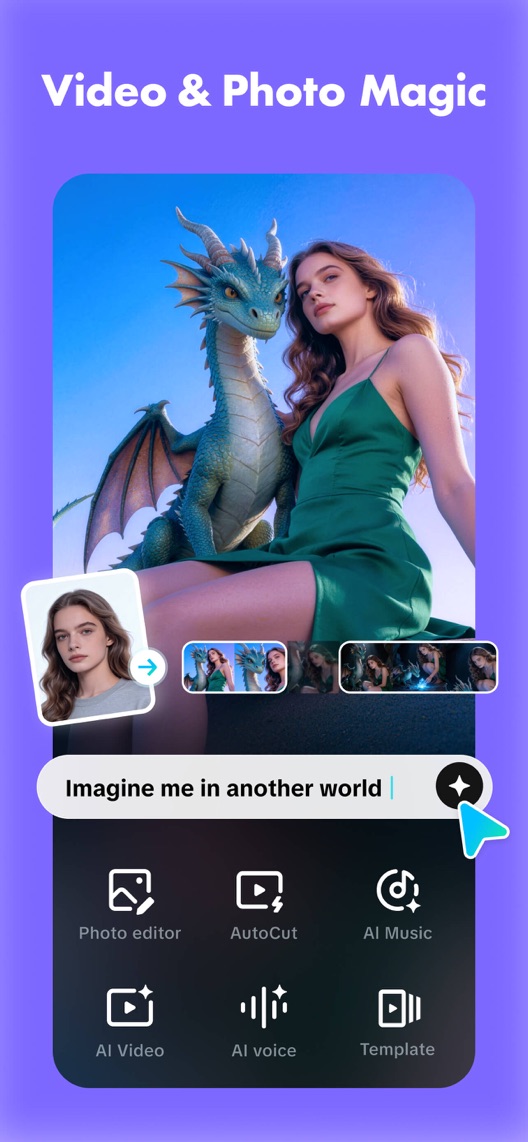
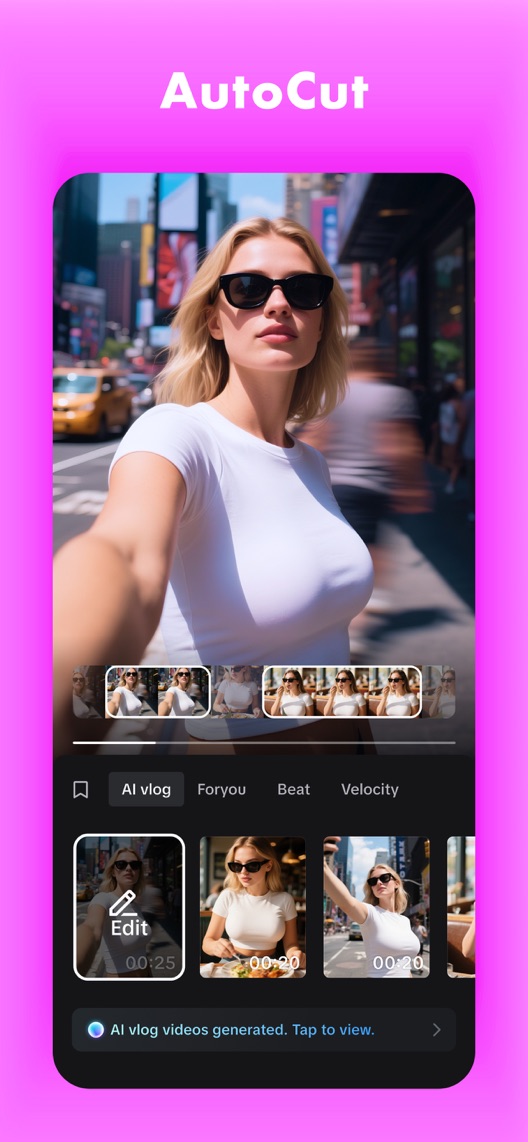
CapCut’s first three still images present transformation, automatic cutting and translation. They are visually confident, but a person who simply wants to cut a clip and add music has to infer the starting workflow. The opportunity is to connect spectacle with a task someone can actually complete.
One storefront, one language and a dated capture. This is an independent editorial audit, not a client case study.
Store & market
Apple App Store · United States
Language & device
en-US · iPhone
Captured
30 September 2026
Creative reviewed
First 3 still screenshots; video and other devices excluded
Observed app name · 28/30 characters
CapCut: Photo & Video Editor
Observed subtitle · 22/30 characters
Video maker with music
Open the source listing ↗. Public text cannot reveal the private keyword field, search volumes, rankings or conversion rates. The recommendations below are proposals to validate.
Three things worth your attention
01
The opening combines an outcome with a feature menu.
What I saw. The first frame shows a portrait transformed into a fantasy scene, a prompt and six tool categories.
My read. The transformation is immediately visible, but the competing tool labels ask a newcomer to choose a workflow before understanding it.
What I’d do. Research whether the first intended action is importing footage, applying a template or generating something new.
02
Automatic cutting shows a result more clearly than the input.
What I saw. Frame two presents a video preview, a strip of clips and several generated vlog options.
My read. This makes assisted assembly tangible. It does not establish how much source material, review or editing the user needs.
What I’d do. Create an alternative showing selected source clips and the resulting editable sequence in one understandable progression.
03
Translation introduces a different purchase intention.
What I saw. Frame three shows language selection and a mouth-matching toggle beneath a translated greeting.
My read. This is relevant to localisation, but it is a different job from everyday trimming or music editing. The image alone cannot establish supported languages or output quality.
What I’d do. Verify current feature access and language coverage before writing a translation-led creative or metadata claim.
The screenshot teardown
The original creative is preserved. Numbered notes sit beside each frame so observations and recommendations stay separate.
Frame 01
A source portrait is linked visually to a fantasy output, with several tool labels below.
The example communicates creative possibility but leaves the exact import-to-result path implicit.
Test idea: Keep this as the current opening control and compare it with one verified editing workflow.
Figure 1. First three still screenshots from the US iPhone listing, captured 30 September 2026. Creative belongs to the app publisher and is reproduced for analysis. Publisher claims inside screenshots are not independently verified.
iMovie uses an outcome-led promise about turning videos into movies.
The lesson: Even broad creative wording can imply a recognisable input. CapCut should decide whether its opening starts with existing footage or a generation prompt.
Figure 2. US listing names and subtitles captured 30 September 2026. These are positioning comparisons, not ranking or revenue comparisons.
The keyword questions I’d investigate
Intent candidates grounded in the listing—not fabricated search-volume or difficulty scores.
video editor / trim video
Visitor’s job: Cut and assemble existing footage.
Evidence: The observed name names video editing and the AutoCut frame includes clips and editing options.
Decision: Inspect the current manual editing flow and research the task behind broad editor queries.
automatic video maker / video templates
Visitor’s job: Turn selected material into a first cut quickly.
Evidence: The second frame shows generated vlog options; the first includes a template category.
Decision: Verify source requirements and access before promising a complete result or a specific time saving.
video translator / AI video
Visitor’s job: Localise or generate video material.
Evidence: The opening demonstrates transformation and the third frame presents translation controls.
Decision: Keep generation and translation intentions separate. Neither visible tool labels nor competitor copy proves demand or output quality.
Proposed copy for discussion. These are not current listing fields or tested winners.
Observed listing
CapCut: Photo & Video Editor
Video maker with music
Proposed alternative
CapCut: Photo & Video Editor
Edit clips, music and captions
Name 28/30 · Subtitle 30/30 characters
Figure 3. A metadata alternative to review against the current listing.
Retain the descriptive name and propose familiar editing tasks in the subtitle. This gives a conventional editing visitor a clearer entry point while advanced capabilities remain in the creative sequence.
The tradeoff: The current subtitle focuses on making video with music. Adding clips and captions redistributes attention and could underplay automatic generation; validate feature availability and qualified query intent before changing it.
A three-frame creative brief
Proposed frame 01
Start with your clips
Show: A verified mobile import view and a short, authorised source-video selection.
Establish the input so the output does not look like a result available without source material or effort.
Proposed frame 02
Shape the first cut
Show: The same material on a current editable timeline, with one real adjustment demonstrated.
Show useful control after assisted assembly rather than a collection of unrelated feature badges.
Proposed frame 03
Check it before sharing
Show: A current preview and export step, with accurate access and format information.
Complete a credible editing task and make any relevant plan limitation visible.
Figure 4. A proposed storyboard, not a fabricated screenshot or a launched treatment. Validate features and access before production.
What three reviewers can teach us
The three 2024 accounts were selected for storage, project continuity and feature access. All carry five-star ratings in the captured source despite critical text, and one describes a different intended rating in the body. These are historical research leads, not a current sentiment or defect assessment.
Sample: 3 selected accounts from 8 displayed reviews. Dates: 3 August 2024–31 December 2024. No sentiment percentage is calculated.
31 December 2024 · 5/5 stars
“storage issue”
A December 2024 reviewer described storage problems alongside comments about plans and template content.
What I’d investigate: Verify current storage behaviour and access expectations; this historical account is not evidence of a present defect.
A September 2024 reviewer objected to perceived changes in feature access.
What I’d investigate: Research entitlement clarity against current plans. Do not reuse the reviewer’s prices or feature classifications as present facts.
The creative shows outputs more clearly than the path to them.
Deliverable: A recorded import, edit, preview and export walkthrough with current access requirements.
Product verification
02
Build a workflow-led opening
A conventional editor visitor may need a different entry point from an AI explorer.
Deliverable: One authentic input-and-timeline first-frame concept.
Focused creative production
03
Clarify project and plan expectations
Selected reviews raise different questions about access and continuity.
Deliverable: A dated entitlement and project-storage checklist used by the creative team.
Evidence review
One test worth running
Does a source-clips-to-editable-timeline opening convert better than the current fantasy-transformation opening?
Audience
Eligible US English iPhone default-page visitors; interpret the result alongside the observed split between conventional editing and AI-generation intentions.
Control
The current transformation first frame with the entire remaining sequence unchanged.
Treatment
Replace only the opening with a verified import-and-edit concept; keep metadata, plan messages and the rest of the creative fixed.
Method
Verify the product flow and comprehension first, then run eligible App Store product page optimization. This compares complete opening concepts rather than isolating one headline or colour.
Primary measure
Platform-reported download conversion in eligible randomized traffic.
Guardrails
In separate research test whether viewers understand required source material, editing work and feature access. Reject concepts that imply every result is free or instantly publication-ready.
Decision rule
Set the useful effect, sample requirement and analysis point from actual baseline traffic. Retain control if inconclusive; downloads do not establish successful exports or subscriber retention.
What could muddy the result
Feature releases, subscription changes, trending templates and shifts in creator acquisition can alter which opening is relevant.
Getting there. The creative demonstrates several distinct capabilities and maintains a recognisable colour system. The gap is between seeing an impressive output and understanding the inputs, controls and access needed to make it. A workflow-led opening deserves testing against the current transformation-led approach, without assuming AI interest is low.
Level 1
Yeah. It really does!
The basics need a serious rethink.
Level 2
I hope no agency is getting paid for this.
Too many obvious things have been left unfinished.
Level 3
The app deserves better.
There is a useful product here. The listing needs to show it.
Level 4
Fine. If ‘fine’ is the goal.
The essentials are there, but there is little to get excited about.
Level 5CapCut is here
Getting there. Keep going.
Good ideas, with a few important gaps still to close.
Level 6
Solid. Put the pitchfork down.
A strong foundation. Look for specific improvements, not a complete restart.
Level 7
Whoever did this knows their stuff.
Clear positioning, thoughtful choices and very few loose ends.
Level 8
Okay, now you’re showing off.
An unusually clear, convincing storefront worth learning from.
An editorial verdict on the captured storefront, not a measured ASO score or an assessment of an agency’s private work.
Your ASO assignment
Choose one editing task and document its actual input, controls and output.
Mark which pictured features require specific access or source material.
Compare a workflow-led opening with the current outcome-led control without changing the rest of the page.
No private analytics, search-rank dataset or internal keyword field was supplied. Review quotations are short excerpts; explanations are our summaries. App names and screenshots belong to their respective owners. We are not affiliated with CapCut. Read our editorial methodology.